Understanding File Deletion: What Happens to Your Files
Have you ever wondered what truly happens when you hit that delete button? When a file is deleted from your computer’s hard drive, it’s not immediately erased. Instead, the file’s location is marked as available space, ready to be overwritten by new data. This means that, until it gets overwritten, your file still exists on the drive, waiting to be recovered by a free data recovery software or an undelete files tool.
The process of file deletion often misleads users into believing their data is gone forever. However, with the right file recovery utilities, there is a good chance to retrieve erased data. These data recovery solutions work by scanning the storage media, such as hard drives, SSDs, or USB sticks, to locate and reconstruct files that can be restored—even those you thought were permanently lost.
It’s crucial to act swiftly if you wish to recover lost files. Continued use of the device increases the risk of overwriting that “deleted” space, making file recovery more challenging. Whether you need to restore deleted documents for personal or professional reasons, the variety of file restoration programs available makes it feasible and often free of charge. For further insights on digital privacy, explore our comprehensive guide on how to lock down your privacy on WhatsApp.
Additionally, understanding how this process works can help prevent future data loss. For more information, you can visit reputable sources such as the PCWorld guide on file recovery which provides detailed methods and tools for recovering deleted files.
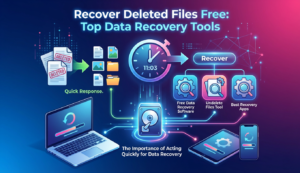
The Importance of Acting Quickly for Data Recovery
When it comes to data recovery, timing is everything. The faster you act after realizing files are lost, the higher the chances of a successful recovery. File recovery utilities work best before new data overwrites the space on your storage device where your files previously existed. Therefore, immediate action is crucial in leveraging free data recovery software or an undelete files tool effectively.
Quick response not only increases the likelihood of retrieving erased data but also minimizes potential data corruption. The longer you wait, the more data recovery solutions have to contend with additional challenges, such as fragmented files or complex data storage structures. Understanding the urgency of the situation prompts the need for swift intervention using the best recovery apps available.
For those dealing with urgent data recovery issues, you might also find the comprehensive protection strategies discussed in our Ultimate WhatsApp Security Guide informative to ensure future data safety. For more guidance on protecting your data, consider authoritative sources such as this resource on How-To Geek’s guide to file recovery.
Steps to Take Before Using Recovery Software
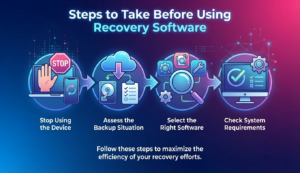
Before diving into free data recovery software to recover lost files, it’s crucial to take some precautionary steps to enhance the success rate of your restorative efforts. Follow these steps to maximize the efficiency of your selected file recovery utilities and ensure the safe retrieval of your important data.
- Stop Using the Device: As soon as you notice the deletion, stop using the affected device immediately. This action minimizes the risk of overwriting the data, which can complicate the ability of any undelete files tool to recover lost files.
- Assess the Backup Situation: Before reaching for a file restoration program, check if you’ve previously backed up the data. Whether through cloud services or physical media, a current backup file is often the easiest and most secure way to restore deleted documents.
- Select the Right Software: Not all data recovery solutions are created equal. Research and choose the best recovery apps tailored to your specific needs. This choice is essential for hard drive recovery or when you need to retrieve erased data from other storage systems.
- Check System Requirements: Ensure that your system meets the requirements of the chosen file recovery utilities. Compatibility with your operating system and hardware can significantly influence the success of the recovery process.
For more comprehensive privacy protection tips, consider visiting our article on how to remove your personal data from the internet. Additionally, you might find Microsoft’s guide on file recovery tips valuable for further insights.
Top Free Data Recovery Tools and Software
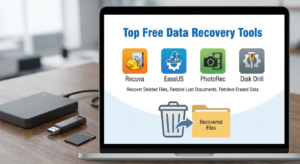
When it comes to restoring deleted documents or recovering lost files, having the right tools at your disposal is crucial. In this guide, we explore some of the best free data recovery software available today. These file recovery utilities are equipped with excellent features to help you retrieve erased data efficiently.
Recuva
Recuva is one of the most renowned free data recovery software options available. Known for its user-friendly interface, Recuva is powerful enough to recover lost files from hard drives, memory cards, external drives, and more. Whether you’re looking to restore deleted documents or photos, Recuva’s capability to undelete files and explore deep data recovery solutions is impressive. Additionally, it supports a wide array of file types, making it a versatile choice for users.
EaseUS Data Recovery Wizard
An industry favorite, the EaseUS Data Recovery Wizard offers robust data recovery solutions without the high price tag. As a file restoration program built to tackle various loss scenarios, EaseUS can retrieve erased data from accidental deletions, formatting errors, or even system crashes. Its intuitive interface and comprehensive scanning features make it one of the best recovery apps in the market.
PhotoRec
PhotoRec specializes in hard drive recovery, particularly when it comes to multimedia files. This free undelete files tool is exceptional for non-commercial setups, focusing on a wide range of formats from images to videos. PhotoRec uses a raw recovery approach, meaning it’s engineered to bypass the file system, making it effective even when common methods fail. Its open-source nature also ensures continuous improvements and community support.
Disk Drill
Disk Drill offers impressive file recovery utilities with enhanced precision. It supports data retrieval across various devices and file systems, including NTFS, FAT32, and exFAT. Disk Drill’s unique Recovery Vault and Guaranteed Recovery features give it an edge, providing an extra layer of data protection unseen in many alternatives. This tool is particularly beneficial for users needing to restore deleted documents quickly and efficiently without compromise.
Interested in safeguarding your digital life beyond just file recovery? Consider checking out our Dark Web Password Check to ensure your online identity is secure.
For further reading and expert insights on the best data recovery practices, you may want to explore resources from PCMag, a reputable source for tech reviews and advice.
How to Choose the Right Data Recovery Tool
Choosing the right data recovery tool is essential for efficiently retrieving your lost files. With numerous options available, it’s important to understand what to look for in a file restoration program. Here’s a guide to help you make an informed decision.
Firstly, determine the type of data you need to recover. Some file recovery utilities are specifically designed for certain file types, while others offer a broader range of coverage. Next, consider the user interface of the data recovery solutions. For ease of use, opt for an undelete files tool with a straightforward, intuitive design.
Check the compatibility of the software with your operating system. Some of the best recovery apps are versatile, supporting multiple platforms. Also, assess the efficiency and speed of the tool. Fast recovery can minimize downtime, crucial for business continuity.
- Verify user reviews and ratings for reliability.
- Ensure the software provides technical support in case of issues.
- Consider cost-effective options that offer basic recovery features for free.
For further data security insights, view our guide on removing personal data from the internet. More tips can be found on Lifewire’s review of free recovery tools.
Recovering Deleted Files on Windows: A Step-by-Step Guide
Accidentally deleted an important file on your Windows PC? Don’t worry, there are systematic ways to recover lost files using free data recovery software. Here’s a simple, step-by-step guide to help you retrieve erased data efficiently.
Step 1: Check the Recycle Bin
Before employing any data recovery solutions, check the Recycle Bin. Oftentimes, deleted files may still be there. Simply right-click on the desired file and select “Restore” to restore deleted documents to their original location.
Step 2: Use File History or Backup
If the file isn’t in the Recycle Bin, employ Windows File History or backup features. Navigate to the folder where the file was stored, right-click, and select “Properties” followed by “Previous Versions.” This option might restore your data using backup copies.
Step 3: Deploy a Free Data Recovery Software
When Recycle Bin and backups don’t work, it’s time to utilize free file recovery utilities. Tools like Recuva serve as excellent undelete files tools. Install the chosen software, run a scan, and follow the instructions to recover deleted files without cost.
For more Windows troubleshooting tips, explore our guide on Windows 11 Bug Fixes 2025 for practical solutions.
By following these steps, you can effectively execute hard drive recovery without hassle. Learn more about the best recovery apps and maintaining data security on reputable sources like WikiHow.
Data Recovery Solutions for Mac Users
Mac users seeking to recover lost files have a variety of data recovery solutions at their disposal. Whether you’ve accidentally deleted important photos, documents, or entire folders, using an effective file restoration program can make a significant difference. Fortunately, several free data recovery software options are available that cater specifically to macOS, allowing you to undelete files efficiently.
One of the best recovery apps for Mac users is Disk Drill. Known for its comprehensive features, it offers an intuitive interface and robust retrieval capabilities, making it a go-to file recovery utility for many. EaseUS Data Recovery Wizard for Mac is another excellent choice, providing easy-to-use tools to restore deleted documents and recover lost files from your Mac’s hard drive recovery.
To enhance your understanding of online threats that could impact your data, check out our guide on cybersecurity myths. For additional tips on safeguarding your files, consider external resources such as How-To Geek. By equipping yourself with the right data recovery solutions and knowledge, you can effectively retrieve erased data and secure your digital environment.
How to Restore Deleted Files on Android Devices
Restoring deleted files on Android devices is simpler than you might think. Whether you accidentally deleted a photo, lost an important document, or need to undelete files, several solutions are available. Many Android users turn to free data recovery software for help. These file recovery utilities are designed to retrieve erased data efficiently.
Start by checking if your deleted files are in the Google Photos app’s trash. If they aren’t, consider using a data recovery app. Some of the best recovery apps for Android include DiskDigger and Undeleter. These tools are excellent file restoration programs, allowing you to recover lost files from internal storage or SD cards.
Before diving into data recovery solutions, ensure your device is rooted if necessary, as some tools require it for deep scanning. Additionally, explore our detailed guide on detecting and removing malware to prevent future data loss.
For more comprehensive insights, visit this resource on top data recovery software. Remember, regular backups can save you from future file recovery woes.
Recovering Lost Files on iOS: Free Methods
For iOS users, losing files can be a common yet distressing experience. Fortunately, there are some effective ways to recover lost files without spending a dime. First and foremost, check your recently deleted folder. The iPhone’s native system retains deleted photos and videos for 30 days, making it a quick and easy method of data recovery solutions without the need for additional tools.
In cases where the recently deleted folder is empty, consider using free data recovery software designed specifically for iOS devices. Tools like Dr.Fone and EaseUS MobiSaver are popular file recovery utilities that can successfully retrieve erased data, including contacts, messages, and more. Ensure your device is backed up regularly, as iCloud backups can serve as a reliable file restoration program for recovering important data.
For a more detailed guide on safeguarding your data and maximizing security, consider exploring our WhatsApp Security Guide. You can also learn more about iOS data recovery by visiting comprehensive resources like PCMag.
Tips for Successful Data Recovery
Recovering deleted files can be a complex task, but employing the right strategies can make the process smoother. Here are some essential tips to help you successfully recover lost files using free data recovery software and other data recovery solutions.
- Act Quickly: The sooner you attempt to retrieve erased data, the higher the chances of a successful recovery. Continued use of your device can overwrite the files, making them irretrievable.
- Choose the Right Tool: Opt for the best recovery apps and file recovery utilities that cater to your specific needs. Whether it’s an undelete files tool or a comprehensive file restoration program, ensure that the software is compatible with your operating system.
- Avoid Writing New Data: Prevent further data from being written to the drive where your deleted files were stored. This includes installing software or saving new files, which can overwrite your lost data.
- Use Reliable Sources: Download your file recovery utilities from trusted and reputable sources to avoid potential malware risks.
- Backup Regularly: Frequently backup important files to avoid the stress of file recovery. Utilizing external storage or cloud services can save you from potential data loss.
For more tips on technological resilience, check out our guide on fixing the Blue Screen of Death in Windows 11. Additionally, for further exploration of data recovery, consider resources like How-To Geek which provides excellent guidance on retrieving files from damaged systems.
Preventing Future Data Loss: Key Strategies
After successfully recovering deleted files using free data recovery software, it’s crucial to implement strategies to prevent future data loss. Regular backups are your first line of defense in hard drive recovery. Utilize cloud services or external drives to ensure you can easily retrieve erased data if needed. Automation tools that schedule regular backups can be particularly effective.
Another essential strategy is to use a reliable file recovery utility for proactive data protection. These tools often come with features to undelete files or alert you to potential data loss situations. Moreover, engaging in regular system maintenance, like updating your software and using antivirus programs, significantly reduces the risk of data loss incidents.
For a deeper understanding of securing your digital footprint, explore our guide on how to remove your personal data from the internet in 2025. Learn more about effective data security practices from industry leaders, such as PCWorld’s guide on file recovery.
Frequently Asked Questions About Data Recovery
What Is the Best Free Data Recovery Software?
When it comes to choosing the best free data recovery software, your options vary based on specific needs and the type of data recovery solutions you seek. Popular choices include Recuva, PhotoRec, and EaseUS Data Recovery Wizard Free Edition. Each of them offers unique features designed for efficient file restoration and retrieving erased data.
These tools are user-friendly and excel at data recovery from various devices, including PCs, USB drives, and SD cards. To explore a selection of the top recovery tools, consider checking out our internal guide on how to remove your personal data from the internet in 2025 for more insights on data management.
Can I Undelete Files If They’re Permanently Deleted?
Recovering files that have been permanently deleted can be challenging but remains possible with the right undelete files tool or file recovery utilities. When files are deleted, they aren’t immediately erased from the storage drive. Instead, the storage space is marked as available, making recovery feasible until new data overwrites the original files.
Tools like Disk Drill and Stellar Data Recovery offer robust solutions tailored for comprehensive hard drive recovery. For a deeper understanding, referring to external resources, such as How-To Geek’s guide on the best free data recovery tools, can provide additional tips.
How Do File Recovery Utilities Function?
File recovery utilities work by scanning your storage device to locate and recover lost files. They utilize complex algorithms to trace data remnants, operating somewhat like a digital detective. Whether you’re aiming to restore deleted documents or recover lost files from corrupted storage, these tools play a vital role in rescuing your data.
By making deep scans and reconstructing files, the utilities enhance their capability to retrieve erased data effectively. If you’re seeking a comprehensive understanding of how these utilities integrate with different systems, our blog on cybersecurity myths in 2025 provides broader technology context that can prove enlightening.