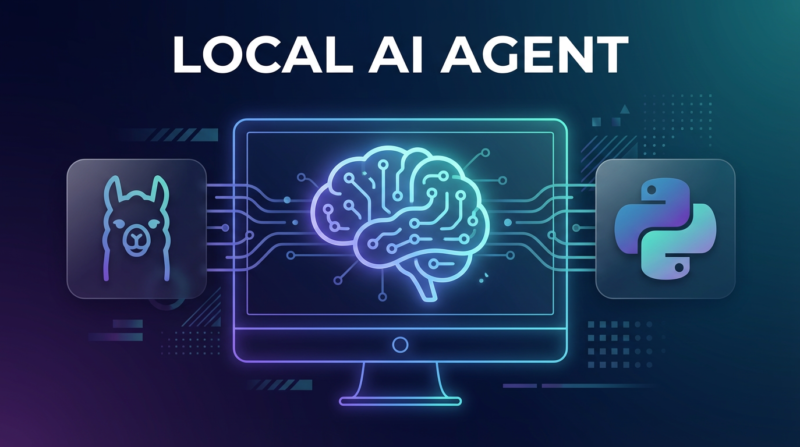
Introduction to Building a Local AI Agent
In recent years, the surge in demand for personalized AI solutions has led developers to explore more efficient methods for building local AI agents. Leveraging Ollama alongside Python, a powerful combination for AI programming, enthusiasts can create custom AI solutions tailored to specific needs.
Developing a local AI agent allows you to maintain control over your data and customize the functionalities according to your requirements. The integration of Ollama AI tools with Python provides a flexible and robust platform for AI agent development. Whether you are looking to automate tasks or create innovative applications, understanding the basics of Python AI tutorial projects can be remarkably beneficial.
To get started, it’s essential to familiarize yourself with Python programming for AI, a critical skill for building efficient AI software. Moreover, grasping Ollama AI integration techniques will enhance your project with advanced capabilities. The blend of these technologies allows you to innovate in areas such as AI automation and AI programming with Python, paving the way for impactful AI projects.
If you’re interested in broader automation strategies, check out our Comprehensive N8n Automation Guide 2025 for further insights into streamlining tasks with technology.
For further reading on AI trends and innovations, consider browsing authoritative sources such as MIT Technology Review.
Why Choose Ollama for Your AI Project?
When diving into the world of AI agent development, selecting the right foundation is key. This is where Ollama shines, offering a robust platform that seamlessly integrates with Python, making the task of building AI software much more approachable. Ollama’s platform is designed to support custom AI solutions, ensuring your project aligns perfectly with your vision. With local AI tools that are both powerful and user-friendly, Ollama facilitates the creation of efficient AI automation systems tailored to specific needs.
Ollama AI integration provides developers with the flexibility to incorporate advanced AI functionalities without overwhelming technical complications. This means that even if you are new to Python programming for AI, you can still achieve outstanding results, setting the stage for successful AI project development. For more insights into harnessing automation effectively, explore our comprehensive guide on n8n automation.
Trusted by a community of AI enthusiasts and professionals, Ollama stands as a beacon in the landscape of AI technology. As noted by Forbes, platforms that encourage user-centric approaches to AI programming are leading the charge in tech innovation. Join the movement and leverage Ollama for your next AI project with confidence.
The Benefits of Creating a Local AI Agent
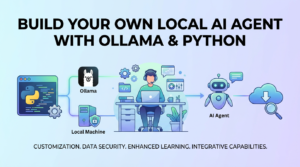
Building your own local AI agent using Ollama and Python can revolutionize the way you engage with AI technology. Not only does it offer unparalleled customization, but it also enhances your understanding of AI programming with Python. Here are some compelling benefits:
- Customization and Control: Developing your AI software allows you to tailor its functionalities to meet specific needs, offering custom AI solutions that are exclusive to you.
- Data Security: A local AI agent keeps your data private since it processes and stores information locally, reducing the risk of data breaches—a concern highlighted by authoritative sources like Forbes.
- Enhanced Learning: By engaging in an AI project with Ollama and playing with local AI tools, you deepen your programming expertise, turning you into an adept Python AI tutorial expert.
- Integrative Capabilities: Ollama AI integration allows seamless alignment with existing systems, boosting AI automation possibilities.
By pairing Ollama with Python, you create a robust AI programming platform, raising your tech proficiency. Need more ways to boost your tech stack? Explore our guide to enhancing tech efficiency with n8n on Bytefixes.com.
Essential Tools and Software Requirements
Building your own local AI agent with Ollama and Python requires a few essential tools and software to streamline the process and ensure success. First and foremost, you’ll need to have Python installed on your system, as it’s the core language for AI programming with Python. Ensure you have the latest version for optimal performance. Also, a text editor like Visual Studio Code or PyCharm is crucial for coding and debugging.
Next, you’ll need to integrate Ollama, an innovative platform that simplifies AI agent development. The Ollama AI integration will assist you in developing robust AI solutions tailored to local environments. To further enhance your project’s capabilities, consider using AI frameworks such as TensorFlow or PyTorch, which are popular in custom AI solutions.
For those seeking to explore more about AI project with Ollama and Python, check out our detailed guide on Top 12 AI Tools of 2025. Advanced users may also find utility in cloud-based platforms like Google Colab for computational support.
Finally, for comprehensive insights into AI agent automation across industries, consider visiting reputable sources like Forbes for current trends and innovations. These tools and resources are pivotal in your journey to build AI software efficiently.
Setting Up Your Development Environment
Before diving into building a local AI agent with Ollama and Python, it’s essential to set up your development environment. This step is crucial for a seamless experience in AI agent development. First, ensure that you have Python installed on your machine. Python’s versatility makes it popular for AI programming, offering ample libraries and frameworks.
Next, integrate Ollama AI for a more sophisticated interaction capability. A stable environment requires a version control system, such as Git, to manage your code efficiently, especially if you’re aiming for custom AI solutions. Visual Studio Code is a reliable choice as an IDE due to its robust extensions for AI programming with Python.
- Install Python from the official website.
- Set up a virtual environment with
venvby runningpython -m venv env. - Integrate the Ollama API with your Python setup.
- Use a code editor like VS Code for efficient development.
After configuration, ensure compatibility of packages within your virtual environment. For further insights on AI automation possibilities, explore our comprehensive guide on agentic AI automation. As you move forward, external resources like MIT Technology Review can offer industry-leading perspectives and trends.
Getting Started with Python for AI Development
Embarking on the journey of AI agent development with Python is both exciting and highly rewarding. Python’s simplicity and vast library support make it a preferred choice for creating AI solutions. To build AI software, you’ll need to install Python along with essential libraries such as TensorFlow, PyTorch, and Scikit-learn. These tools are fundamental in crafting robust AI algorithms capable of Ollama AI integration.
For beginners looking for a Python AI tutorial, the Comprehensive n8n Automation Guide can provide insights into the automation aspects of AI projects. Python programming for AI demands a strong understanding of data manipulation and machine learning algorithms, which these libraries facilitate via intuitive APIs.
- Install Python: Begin by downloading the latest version of Python from the official website. Ensure it’s correctly set up with the package manager pip.
- Set Up Virtual Environment: Use virtual environments to manage dependencies and maintain project-specific configurations.
- Library Installation: Utilize pip to install AI libraries:
pip install tensorflow torch scikit-learn.
Getting familiar with these tools paves the way for further customization, enabling you to craft bespoke AI solutions. For an additional resource on Python’s impact in technology, consider exploring [an external source on Python’s role in machine learning, such as](https://www.forbes.com/sites/forbestechcouncil/2022/02/15/why-python-is-a-great-choice-for-machine-learning/?sh=3d8b8f692e10).
A Deep Dive into Ollama’s Capabilities
As you embark on your journey to build AI software with Ollama and Python, it’s crucial to understand the robust capabilities that Ollama brings to the table. Ollama is designed to facilitate the development of local AI agents by offering seamless AI integration with existing systems. Specifically, it’s an excellent fit for developers looking to create custom AI solutions using Python programming.
Ollama excels in AI automation and customization, allowing developers to tailor AI agents according to specific project requirements. If you are interested in learning about comprehensive automation guides, you might find our detailed tutorial on n8n automation insightful.
- Easy AI integration with a wide range of applications.
- Robust architecture that supports custom AI solutions.
- Flexible design for local AI tools, enabling secure, on-premise AI project with Ollama.
For those new to AI programming with Python, Ollama offers an intuitive platform that simplifies the learning curve. Its interoperability means that developers can effortlessly integrate Ollama with other AI automation frameworks, optimizing AI agent development. Aspiring developers can further enhance their understanding by exploring expert commentary from Forbes on the latest AI trends.
Installing Ollama: A Step-by-Step Guide
Diving into AI agent development begins with setting up the right tools. Ollama, a key player in Ollama AI integration, facilitates building custom AI solutions with ease. This section provides a straightforward guide to installing Ollama, ensuring that your local AI tools are ready to go. Follow this Python AI tutorial to get started on your AI project with Ollama.
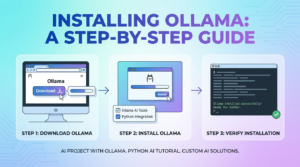
Step 1: Download Ollama
Visit the official Ollama website to download the latest version suited for your operating system. Ensure that your system meets all the specified requirements for a smooth installation process. [IMAGE_PLACEHOLDER]
Step 2: Install Ollama
Open the downloaded installer file. Follow the on-screen prompts to complete the setup. This automated wizard simplifies the installation, so you don’t need extensive AI programming with Python skills to proceed. Be sure to select the components relevant to your development needs.
Step 3: Verify Installation
After the installation completes, verify it by launching Ollama from your applications. Test its functionality by executing a basic AI automation task, like a sample AI script, to ensure it’s correctly installed and ready for Python programming for AI.
For more insights on automation, check out our Comprehensive n8n Automation Guide. Additionally, exploring resources like Forbes Technology can provide broader perspectives on AI development advancements.
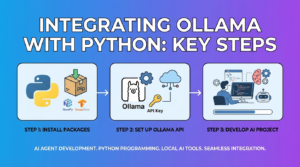
Integrating Ollama with Python: Key Steps
Integrating Ollama with Python is a crucial step in building your local AI agent, and it involves a series of straightforward yet essential tasks. This section will guide you through the key steps to follow for a successful Ollama AI integration, allowing you to harness Python’s power within your custom AI solutions.
Step 1: Install Required Packages
Begin by ensuring that your Python environment is equipped with the necessary packages for Ollama integration. You can use package managers like pip to install libraries essential for AI programming with Python, such as NumPy and TensorFlow, facilitating seamless AI agent development.
Step 2: Set Up Ollama API
Access the Ollama platform and obtain your API key to enable functionality between Python and Ollama. This step is fundamental in unlocking Ollama AI integration capabilities. Follow the API documentation provided by Ollama to establish connection endpoints and begin building your AI software.
Step 3: Develop Your AI Project with Python
With the API connection established, start coding your AI project with Ollama using Python. This involves writing scripts that automate tasks, process data, and learn over time. To learn more about AI automation techniques, explore our detailed guide on automation.
- Ensure efficient data handling and processing
- Implement machine learning models as needed
- Test the AI system for accuracy and responsiveness
By following these steps, you can develop robust local AI tools that leverage Ollama’s potential. For more advanced insights, check out the latest trends in AI on Forbes.
Designing Your AI Agent’s Workflow
Creating an effective workflow for your AI agent is a critical component of your AI project with Ollama. Start by identifying the specific tasks you want your agent to automate, ensuring they align with the capabilities offered by Ollama AI integration and Python programming for AI. Consider breaking down these tasks into smaller, manageable components to facilitate efficient AI automation.
The process begins with defining the input data, which will fuel your AI agent’s decision-making processes. You can use Python to preprocess the data, ensuring it’s clean and suitable for model ingestion. Next, you’ll build AI software components that process this data, either by leveraging pre-built Ollama modules or developing custom AI solutions that cater to your unique requirements.
- Define tasks clearly and align them with the capabilities of your AI agent.
- Break tasks down into stages for better manageability.
- Use Python to preprocess and clean your input data.
- Create modular components that can be easily updated or replaced.
For further exploration, consider reading our Comprehensive n8n Automation Guide to enhance your understanding of automated workflows.
For more insights into the latest AI trends and tools, check out resources such as Forbes.
[IMAGE_PLACEHOLDER]Programming the Core Functions of Your AI Agent
Once you’ve familiarized yourself with the basics of AI agent development, it’s time to dive into programming the core functions of your AI agent using Python. Python’s versatility and extensive libraries make it an ideal choice for building custom AI solutions. You’ll primarily be leveraging Ollama AI integration to lay down the foundation for your agent’s capabilities.
The key is to structure your code efficiently, enabling seamless communication between various modules of your AI. Start by defining functions that align with your AI’s goals. Whether it’s speech recognition, data processing, or real-time problem-solving, Python programming for AI ensures a robust approach. Implementing libraries like NumPy for numerical data and TensorFlow for machine learning can enhance your local AI tools, providing a comprehensive platform for growth.
Throughout this step, focus on building a flexible architecture that accommodates future updates and functionality enhancements. This process will not only ease the development of your AI project with Ollama but also streamline AI automation tasks. For additional insights on automation within tech projects, you might find our Comprehensive n8n Automation Guide 2025 helpful.
As you build AI software, it’s crucial to test each function thoroughly to ensure their effectiveness. Resources like the Forbes AI insights can provide valuable knowledge to refine your approach.
Testing and Debugging Your AI Agent in Python
Once you have developed your local AI agent with Ollama and Python, testing and debugging are essential to ensure the software functions as expected. Since you’re on a journey in AI agent development, focus on isolating and fixing issues by using Python’s vast array of debugging tools and libraries.
Start by employing PDB (Python Debugger) to interactively analyze your code. Breakpoints allow you to pause execution and examine the state of your program. It ensures that integrating Ollama’s AI models runs smoothly. Furthermore, leverage unit testing frameworks like unittest to validate the performance of each component.
- Use print statements and logging for tracing the flow and identifying bugs.
- Test various scenarios by manipulating inputs and observing outputs.
- Optimize performance by profiling bottlenecks in your code.
For a comprehensive understanding of enhancing tech capabilities, explore our guide on optimizing workflow automation. Enhance your custom AI solutions by referring to external resources like Forbes’ insights on AI trends. With these debugging strategies, your Python programming for AI will lead to robust and efficient AI automation.
Enhancing Your AI Agent with Advanced Features
Transforming your project into a fully functional AI agent can be simplified by integrating advanced features that elevate performance and capabilities. To truly innovate with your AI agent built using Ollama and Python, it’s crucial to explore custom AI solutions tailored to your needs. Utilizing AI programming with Python, you can embed functionalities like natural language processing, image recognition, and data analytics, offering a comprehensive AI experience.
Consider incorporating Ollama AI integration to leverage pre-built models while developing your own custom models. This powerful combination enhances learning processes, allowing your AI to act smarter and more autonomously. Dive into additional refinements like automated decision-making and real-time data processing to polish your local AI tools.
- Leverage Python’s libraries such as TensorFlow and Scikit-learn for machine learning capabilities.
- Implement multi-threading to ensure your AI agent handles tasks efficiently.
- Focus on robust error handling and security measures to improve your AI’s reliability.
For more insights into AI automation and maximizing efficiency, check our insightful post on boosting workflow automation efficiency. Additionally, explore Forbes’s exploration of AI’s role in driving business success for a broader industry perspective on AI advancements.
Securing Your Local AI Agent: Best Practices
Building a local AI agent using Ollama and Python offers impressive capabilities, but it’s crucial to prioritize security throughout the development process. Ensuring that your AI agent is secure can prevent vulnerabilities and protect sensitive data. By following best practices, you can effectively secure your custom AI solutions and leverage the full power of local AI tools.
Firstly, make sure that your Python programming for AI includes secure coding principles. This involves regularly updating libraries and frameworks to patch any potential security flaws. Additionally, consider deploying firewalls and intrusion detection systems to safeguard your AI software development environment from unauthorized access or AI automation threats.
- Use Encryption: Always encrypt data in transit and at rest within your AI agent framework to prevent data breaches.
- Implement Access Controls: Restrict access to your local AI agent by incorporating robust authentication measures.
- Regular Audits: Perform security audits to identify and rectify vulnerabilities within your AI programming setup.
For those involved in AI agent development, it’s advantageous to stay informed on current threats and evolving security strategies by following credible sources like MIT Technology Review. For further insights into enhancing your tech stack’s security, explore our comprehensive guide on n8n Workflow Automation Errors and Efficiencies.
Optimizing Performance for Your AI Agent
Once your AI agent is up and running, it’s essential to fine-tune its performance to ensure optimum efficiency. With both Ollama AI integration and custom AI solutions, the key to effective optimization lies within understanding and leveraging the capabilities of local AI tools. This section delves into strategies you can implement to boost the performance of your AI agent and effectively handle resource management.
Enhance Processing Efficiency
Improving the processing efficiency of your AI agent involves optimizing the underlying code in your Python AI tutorial project. Start by profiling your Python programming for AI to identify bottlenecks. Utilize libraries such as NumPy and TensorFlow to enhance computation speeds. Consider multithreading or parallel processing to maximize the agent’s capacity to perform tasks simultaneously, thus speeding up AI automation.
Resource Management
Effective resource management is crucial when running AI projects on local hardware. This involves tuning memory usage and storage capabilities. Conduct regular audits and benchmark tests to ensure the AI agent utilizes resources optimally without overloading the system. Balance the workload by scheduling tasks during off-peak hours, a strategy reminiscent of efficient n8n automation processes used in tech stacks.
Regular Updates and Testing
Keeping your AI agent software up-to-date is pivotal for maintaining performance, much like addressing the latest technological advances in AI programming. Regularly update your code libraries and test new algorithms to ensure peak performance. Continuous testing not only bolsters the agent’s reliability but also facilitates the integration of innovative features, reflecting the dynamic nature of AI project development.
For more insights on improving AI solutions, check out this MIT Technology Review article on the latest in AI advancements.
Troubleshooting Common Issues in AI Development
Building your own local AI agent with Ollama and Python can be a rewarding endeavor, yet it may present a few hurdles along the way. Here’s a guide to some typical problems and how to overcome them in your AI agent development journey.
Integration Challenges with Ollama AI
One common issue is the seamless integration of Ollama AI into your project. This can often stem from mismatches in software versions or configuration errors. To begin troubleshooting, ensure that both your Ollama AI tools and Python libraries are up to date. Consulting the AI tools resource can provide insights into tools that align well with your current setup.
Python Programming Errors
Errors in Python programming for AI can result from syntax mistakes, undefined variables, or incorrect library installations. Use debugging tools and carefully review your stack traces to identify any coding errors. Leveraging Python AI tutorials can be invaluable to rectify these common pitfalls.
Performance Optimization
Inefficient algorithms or resource management issues can slow down AI automation processes. Consider optimizing your code by profiling it and identifying bottlenecks. Libraries like NumPy or Pandas can enhance performance when dealing with data-intensive tasks. Read more about efficient coding practices in AI on authoritative platforms like Forbes.
By addressing these challenges, you’ll be well-equipped to build reliable and custom AI solutions while minimizing disruptions in your AI project with Ollama.
Conclusion: Launching Your Custom AI Agent
Building your own local AI agent with Ollama and Python has never been more accessible. By following this step-by-step guide, you’ve integrated Python’s robust capabilities with Ollama’s intuitive interface to create a tailored AI solution. Your AI agent is ready to handle tasks autonomously, showcasing the power of AI automation.
As you venture into AI agent development, remember that the process isn’t just about coding—it’s about creating impactful AI applications. For those interested in further AI programming with Python, continually refining your agent with new datasets and algorithms will enhance its functionality and accuracy. Explore more on custom AI solutions and local AI tools to optimize your projects.
Your journey into building AI software marks the beginning of an exciting AI project with Ollama. You now have the foundation to scale your agent’s capabilities, making your software more intelligent and responsive. For further insights on automating workflows and enhancing your tech stack, check out our comprehensive N8n Automation Guide. To stay informed on the latest in AI, Forbes’ AI trends are a great resource.