Introduction: The Dark Web and Your Passwords
In today’s digital age, the importance of safeguarding your personal data has never been more crucial. With increasing reports of password breaches, many are left wondering, “Is my password on the dark web?” This hidden part of the internet is where cybercriminals often trade stolen data, making it essential for everyone to invest in password security and dark web monitoring.
The dark web, a part of the internet that is not indexed by traditional search engines, has gained notoriety as a marketplace for illegal activities, including the sale of compromised passwords. As such, understanding what the dark web is and how to check for a possible breach is crucial in maintaining online security.
Being proactive about protecting your passwords can prevent identity theft and ensure your personal information remains safe. Utilizing a dark web scan can provide you with insights into whether your passwords have been exposed in a breach. Implementing strategies like regular password updates and using password managers can greatly improve your online security.
For more comprehensive approaches to strengthening your cybersecurity, consider exploring our guide on automation and efficiency in your tech stack. Additionally, websites like Forbes regularly provide valuable insights into the latest cybersecurity trends and tips.
Understanding the Dark Web: A Brief Overview
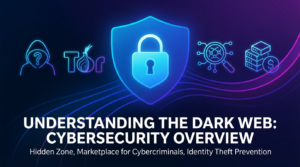
To effectively protect your passwords, it’s crucial to understand the dark web’s nature. The dark web is a part of the internet lurking beyond the reach of standard search engines, hosting numerous activities away from public scrutiny. This hidden zone has become a marketplace for cybercriminals trading personal information such as passwords, stolen identities, and other sensitive data, making it vital for individuals to consider dark web monitoring as a part of their cybersecurity strategies.
Operating across various hidden networks like Tor, the dark web is not inherently evil. However, its anonymity offers a haven for illegal activities. To bolster your password security, utilize services that perform a dark web scan to detect potential breaches.
Understanding the dynamics of the dark web can empower you to take proactive measures. Employing identity theft prevention techniques and staying informed on the latest cybersecurity tips can help shield your personal information from being compromised. Check out our comprehensive guide on automation in cybersecurity to enhance your online security posture.
For an in-depth understanding of the technological aspects of the dark web, you may find this Forbes article particularly insightful.
How Do Passwords End Up on the Dark Web?
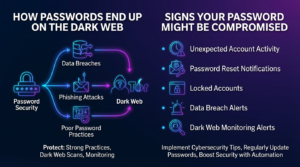
In today’s digital age, compromising password security has become a prevalent issue, leading many to question, “Is your password on the dark web?” There are several ways passwords can end up on this hidden part of the internet, and understanding these can greatly enhance your online security efforts. One of the primary reasons is data breaches. When hackers infiltrate databases, they often extract sensitive information, including usernames and passwords, and sell them on the dark web marketplaces.
Additionally, cybercriminals use phishing attacks to trick users into revealing their login credentials. These deceptive tactics can be alarmingly effective, enabling identity theft and other malicious activities. Moreover, poor password management practices, such as using the same password across multiple sites, can further elevate the risk. Once one account is compromised, it can lead to a domino effect of breaches.
To protect your passwords and ensure robust identity theft prevention, employing strong password practices and regular dark web scans is crucial. Staying informed about cybersecurity tips and understanding the necessity of dark web monitoring are key to safeguarding your information. For more insights into maintaining robust cybersecurity, explore our guide on external strategies like AI malware detection with Python. Additionally, consider resources from cybersecurity authorities like Forbes to stay ahead of potential threats.
Signs Your Password Might Be Compromised
In today’s digital landscape, ensuring robust password security is more critical than ever. Regular monitoring for signs of a compromised password can help safeguard your online identity and fend off dark web threats. Here are some key indicators that your password might be at risk:
- Unexpected Account Activity: If you notice unfamiliar transactions or changes in any of your accounts, it could be a sign of unauthorized access.
- Password Reset Notifications: Receiving password recovery or reset emails you didn’t initiate suggests someone is attempting to breach your account.
- Locked Accounts: Frequent lockouts from your account, despite entering the correct password, may indicate that someone is trying to hack into your account by guessing your password.
- Data Breach Alerts: Pay heed to notifications from services you use regarding data breaches. Regularly perform a password breach check to ensure your credentials haven’t been leaked.
- Dark Web Monitoring Alerts: Engaging in dark web protection and scans can notify you if your credentials have been exposed on the dark web.
Implementing effective cybersecurity tips and regularly updating your passwords can significantly reduce the risk of identity theft. For more comprehensive protection strategies, explore our guide on automation techniques using n8n to boost your online security.
For additional reading on how to protect your passwords and manage digital threats, refer to this Forbes article on account security best practices.
Tools to Check if Your Password is on the Dark Web
To safeguard your online security, it is crucial to regularly perform a dark web scan to ensure your passwords haven’t been compromised. There’s an abundance of tools specifically designed for dark web monitoring, enabling you to efficiently conduct a password breach check. These tools provide peace of mind by offering robust password security and dark web protection features. Here’s an overview of some top tools you could use:
- Have I Been Pwned: This popular online tool allows users to verify if their credentials have been compromised on the dark web. You simply enter your email address, and the tool scours through its extensive database of leaked information.
- Identity Guard: This service offers comprehensive identity theft prevention, including dark web monitoring. It sends real-time alerts if your personal information is detected online.
- SpyCloud: Known for its thorough dark web checks, SpyCloud helps protect your passwords by notifying you of any breaches and recommending immediate action.
Using these tools in combination with advanced cybersecurity tips can significantly enhance your digital safety. For more detailed insights, websites like Forbes provide in-depth analyses on cybersecurity trends and effective protection strategies.
Step-by-Step: Using Online Tools to Check Password Breaches
In today’s digital age, ensuring password security is more vital than ever. If you’re worried about your password appearing on the dark web, utilizing online tools can provide peace of mind. Here’s a simple guide on how to conduct a password breach check using reliable online resources.
1. Choose a Trusted Password Breach Tool
Begin by selecting a credible dark web monitoring tool that specializes in identifying compromised credentials. Websites like Have I Been Pwned offer simple yet effective interfaces for checking if your email or password has been breached. These platforms are designed to enhance online security through comprehensive scans.
2. Enter Your Email Address or Password
Once you’ve chosen a tool, input your email or the password you suspect might be compromised. This action will trigger a dark web scan that searches for any mentions in known data breaches.
3. Analyze the Results
Upon completion of the scan, you’ll receive a detailed report. If your credentials appear in any password breaches, it’s essential to act quickly. Immediate steps include changing your passwords and enhancing your cybersecurity measures.
4. Take Preventive Measures
To protect your passwords and prevent future incidents, consider implementing strong, unique passwords and using a password manager. Furthermore, regular identity theft prevention and dark web protection practices can significantly reduce risks.
For additional insights on safeguarding your online presence, explore our comprehensive guides like this one on troubleshooting connectivity issues and boosting your digital security setup.
For a deeper understanding of cybersecurity tips, consider reading more about these strategies from authoritative sources like Forbes.
What to Do if Your Password is Found on the Dark Web
Discovering your password on the dark web can be alarming, but swift action can mitigate the risks of a potential security breach. Here’s a step-by-step guide to enhance your password security and protect yourself from identity theft.
- Change Compromised Passwords Immediately: Update your password on all affected accounts with a strong, unique password. Consider using a password manager to generate and store complex passwords securely.
- Enable Two-Factor Authentication (2FA): For added security, activate 2FA on your accounts to require an additional verification step beyond your password.
- Monitor Your Accounts: Keep an eye on your financial accounts and emails for any suspicious activity. Regular dark web monitoring using a reliable service can help avert future breaches.
- Educate Yourself on Cybersecurity Tips: Understanding how to secure your online presence is key. Explore resources on password breach checks and identity theft prevention for comprehensive guidance.
By taking these steps, you can bolster your defenses against potential attacks and ensure stronger online security in today’s digital landscape.
How to Create a Strong Replacement Password
In the wake of a password breach check, securing a strong replacement password is crucial for maintaining robust online security. A well-crafted password serves as your first line of defense against cyber threats and helps in identity theft prevention. Here are some essential cybersecurity tips to create a high-strength password.
- Lengthy and Complex: Aim for a password that is at least 12-16 characters long. Incorporate a mix of upper and lower-case letters, numbers, and special symbols to enhance complexity.
- Avoid Predictable Patterns: Do not use easily guessable information such as birthdays, common phrases, or sequences like “123456” or “password.”
- Unique Per Account: Ensure that each online account has a unique password. This strategy enhances your dark web protection by minimizing risks if one password is compromised.
- Utilize a Password Manager: Tools like password managers not only securely store your passwords but also generate strong, random passwords, further bolstering your password security.
For continuous protection, consider a dark web scan with a trusted service to identify potential threats early. Implementing these strategies, you can effectively protect your passwords from unauthorized access.
Learn more about online security measures in our article on protecting your data from browser flaws. For further reading, check out the latest insights on password security from Forbes Tech Council.
Understanding Two-Factor Authentication and Its Importance
In today’s digital landscape, with emerging threats like identity theft and password breaches, understanding two-factor authentication (2FA) has become essential to protect your passwords. Two-factor authentication is a security measure that requires two forms of verification before granting access to an account. Typically, it combines something you know, like your password, with something you have, such as a smartphone app that generates a unique code.
Integrating 2FA into your online security practices can significantly enhance password security by adding an extra layer of protection. Even if your password appears in a dark web scan, 2FA can prevent unauthorized access to your accounts. This form of multi-layered security is crucial for identity theft prevention and ensuring that cybercriminals cannot easily exploit your information.
For those new to implementing online security strategies, tools and resources are available to guide you. Check out our guide on AI malware detection for further insights into boosting your cybersecurity.
According to a report from Forbes, adopting comprehensive measures like 2FA can substantially reduce the risk of unauthorized access and other cybersecurity threats. Therefore, implementing 2FA is not just an option but a necessity in modern cybersecurity tips and practices.
Password Managers: A Smart Solution for Better Security
In the cyber age, password security is paramount, especially with the looming threat of seeing your credentials appear on the dark web. A proactive way to protect your passwords is by using a password manager. These tools not only generate strong, unique passwords but also store them securely, making it difficult for cybercriminals to penetrate your online defenses.
Password managers are an essential tool in dark web protection. They offer a streamlined approach to password management by allowing you to manage multiple accounts without the need to remember each password individually. By safeguarding your login details and encrypting them, password managers mitigate the risk of identity theft and unauthorized access.
- Generate robust, random passwords to enhance password security.
- Autofill forms securely, deterring phishing attempts.
- Monitor for any potential password breach.
To further fortify your online security, consider conducting regular dark web scans with a reputable service. This, coupled with a reliable password manager, forms a formidable line of defense against potential cyber threats. For more insights into enhancing your cybersecurity posture, explore our AI malware detection guide.
For additional guidance, check out resources like Forbes’ guide on password managers.
Tips for Maintaining Overall Digital Security
In an era where cyber threats are rampant, ensuring password security becomes indispensable. So actively keeping a check on whether your password is on the dark web isn’t the only step; maintaining your digital security across various aspects is critical. Here are some tips that can serve as a sturdy shield in the digital world.
- Use Strong, Unique Passwords: Create complex passwords for different accounts. Avoid using personal information and opt for a blend of letters, numbers, and symbols.
- Enable Two-Factor Authentication (2FA): This adds an extra layer of protection by requiring not just your password, but also a second form of verification.
- Conduct Regular Dark Web Scans: Frequently perform a password breach check to ascertain if your credentials are compromised.
- Stay Updated on Cybersecurity Tips: Regularly refresh your knowledge on online security trends and vulnerabilities.
- Invest in a Dark Web Monitoring Service: Consider employing services that continuously scan the dark web to alert you if your information appears there.
- Avoid Public Wi-Fi Networks: They are often less secure, making it easier for cybercriminals to intercept your data.
For more insights into protecting your data from open networks and other vulnerabilities, check out our guide on tackling slow Wi-Fi issues. Additionally, staying informed with expert advice on cybersecurity is essential for effective dark web protection and identity theft prevention.
Common Mistakes to Avoid in Password Management
In today’s digital age, password management is critical for ensuring online security and protecting your digital identity. However, many users unintentionally make errors that leave their passwords vulnerable to breaches and exposure on the dark web. Below, we highlight some of the most common mistakes to avoid in password management to enhance your cybersecurity strategy.
- Using Weak Passwords: One of the most prevalent mistakes is using simple or easily guessable passwords. Always opt for a combination of upper and lower case letters, numbers, and symbols to ensure robust password security. [IMAGE_PLACEHOLDER]
- Reusing Passwords: Reusing the same password across multiple sites is a significant risk factor. A single breach can compromise all your accounts. Implement a unique password for each account to safeguard against a broader password breach check.
- Ignoring Dark Web Monitoring: Many users neglect the importance of dark web monitoring. Regularly performing a dark web scan can alert you to any breached data, allowing for timely response and identity theft prevention. For more advanced cybersecurity tips, consider reading our comprehensive guide on malware detection techniques.
- Overlooking Two-Factor Authentication: Two-factor authentication adds an extra layer of protection for your accounts. Ignoring this feature leaves your accounts more susceptible to unauthorized access and threats compromising your personal and financial data.
Enhancing your online security not only protects your passwords but also fortifies your overall digital well-being. For more insights into protecting your digital presence, check out reputable resources like Forbes’ cybersecurity section for the latest trends and tips.
How Often Should You Change Your Passwords?
When it comes to password security, one of the most frequently asked questions is how often should you change your passwords? Experts generally recommend updating your passwords every three to six months to help maintain online security and minimize the risk of identity theft. With the rise of cyber threats, including those that end up on the dark web, this proactive measure can significantly enhance your digital safety.
Regular password updates are crucial for robust dark web protection. Frequent changes make it difficult for hackers to access your accounts, even if your password is compromised during a data breach. A consistent schedule for password updates is an essential part of effective dark web monitoring and cybersecurity tips.
- If a service you use experiences a password breach, change your password immediately.
- Consider using a password manager to help you create and remember complex passwords.
- Enable two-factor authentication for an added layer of security.
For further insights on securing your digital life, you might find our guide on AI malware detection with Python useful. Enhance your defenses by staying informed about the latest in cybersecurity measures. Learn more from cybersecurity experts.
What to Do if Your Entire Account is Compromised?
Realizing your account has been compromised can be alarming, especially if your password is found on the dark web. Taking immediate action is critical to protect your passwords and personal data. Follow these steps to regain control:
- Change Passwords Immediately: Log in and update your password with a strong, unique one. Use a mix of characters, numbers, and symbols to enhance password security.
- Enable Two-Factor Authentication (2FA): Fortify your account by enabling 2FA wherever possible, adding an extra layer of identity theft prevention.
- Review Account Activity: Check for unauthorized activities on your account and report any suspicious transactions to your provider.
- Set Up Dark Web Monitoring: Use tools such as dark web scans to continuously monitor for any potential threats.
- Secure Linked Accounts: If your account was linked to other services, ensure those accounts are also secure by following similar steps.
For more insights into enhancing your online security, you might find our article on protecting your data from major browser flaws both relevant and useful. For further information on safeguarding your digital identity, consulting expert resources from Forbes can offer valuable cybersecurity tips.
The Role of Cybersecurity in Protecting Personal Information
In our digital age, cybersecurity plays a crucial role in safeguarding personal information and preventing breaches that can lead to your password appearing on the dark web. Strong cybersecurity measures are essential to protect your passwords and maintain online security, particularly in the face of growing threats like identity theft and unauthorized data access. By implementing robust security protocols, you can significantly minimize the risk of a password breach.
One effective way to enhance your online security is through regular dark web monitoring. This proactive approach allows individuals and businesses to perform a dark web scan, identifying compromised credentials before they are exploited. Coupling this with password security practices, such as using strong and unique passwords, further strengthens your defense.
Moreover, staying informed about cybersecurity tips can offer valuable guidance in safeguarding personal information. For more insights on enhancing your digital security, you can explore our article on detecting and removing new Android malware like GhostTap.
For additional guidance, the Forbes Tech Council offers essential cybersecurity practices to prevent cyberattacks, empowering individuals to take charge of their personal information’s safety.
Conclusion: Staying Vigilant Against Dark Web Threats
As cyber threats become increasingly sophisticated, staying vigilant against dark web threats is crucial. Regularly carrying out a dark web scan for your personal information is essential in maintaining robust online security. By proactively monitoring for any password breach and deploying cybersecurity tips, you can protect your passwords and minimize risks associated with identity theft.
Making use of dark web monitoring tools can greatly enhance your dark web protection strategy. These tools allow users to stay informed about potential vulnerabilities and react swiftly to protect their digital footprint. Discover automation tools to enhance your tech stack and streamline your efforts in safeguarding personal data.
Beyond individual efforts, it is equally important to stay informed on the latest developments in cybersecurity. Reputable sources such as Forbes offer valuable insights and updates on emerging threats and solutions. By remaining informed and proactive, you lay a strong foundation for password security, expertly defending against dark web threats.