
Introduction: Understanding Sudden WiFi Slows in 2025
In 2025, a sudden slowdown in your WiFi connection can disrupt your day-to-day activities, from remote work to streaming entertainment. Several factors could be at play, causing sluggish speeds that need timely intervention to restore the smooth operation of your network. Understanding the root causes of these WiFi speed issues is the first step in tackling them effectively.
One possible culprit might be the latest updates in technology, which continue to push the boundaries of what our internet connections can handle. As devices multiply and data loads increase, your home network may require optimization to keep up. Additionally, interference from neighboring networks is a more common issue than ever, especially in densely populated areas where wireless signals overlap.
For 2025 WiFi troubleshooting, consider the impact of new household gadgets and smart home devices, which can also slow down your internet connection by competing for bandwidth. Another angle to explore is router placement; an incorrectly located router can significantly affect WiFi speed and performance.
As you seek solutions to improve WiFi speed, resources like The Comprehensive n8n Automation Guide 2025 on ByteFixes can offer insights into effective network management. Moreover, authorities such as Forbes highlight the importance of keeping abreast of emerging technologies and WiFi performance tips that could be invaluable in resolving WiFi problems.
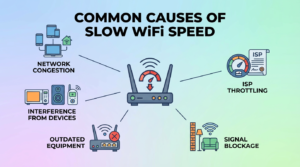
Common Causes of Slow WiFi Speed
Experiencing a sudden drop in WiFi performance can be frustrating, especially in 2025 when high-speed internet is a necessity. Identifying the common causes of slow WiFi speed is the first step in tackling this issue effectively. Fortunately, understanding these factors can help you mitigate them and improve WiFi speed.
- Network Congestion: With multiple devices connected to your home network, including smart appliances, network traffic congestion can significantly slow down your WiFi. During peak usage hours, bandwidth is stretched thin, leading to WiFi speed issues.
- Interference from Other Devices: Household devices such as microwaves or Bluetooth gadgets can interfere with the WiFi signal, causing performance dips. Ensure your router is placed away from such interference to enhance the wireless connection.
- Outdated Equipment: Using outdated routers or modems may not support the latest networking standards, hindering your ability to optimize home network capabilities. Upgrading to the latest technology can resolve WiFi problems effectively.
- Signal Blockage: Physical barriers like walls and furniture can obstruct WiFi signals. Positioning your router in a central, open location can help alleviate this issue and improve WiFi speed.
- ISP Throttling: Internet service providers may intentionally slow down your connection if you exceed data limits. Reviewing your subscription plan or contacting your ISP can provide insights into any imposed restrictions.
Addressing these root causes can significantly enhance WiFi performance. For additional insights on optimizing tech appliances, explore our comprehensive n8n automation guide: n8n Automation Guide 2025. For further reading on improving home internet experiences, see this article from Forbes on advanced network upgrades.
How New Technology in 2025 Affects WiFi Performance
The landscape of WiFi technology has dramatically evolved, influencing how we experience wireless connections at home and work. With the advent of advanced IoT devices, AI-powered routers, and 5G integration in 2025, maintaining optimal WiFi performance has become a challenge. These technologies can both enhance and inadvertently disrupt your internet speed, contributing to WiFi speed issues.
The primary reason for these disruptions is the increased demand for bandwidth. Devices like smart home systems and AI components consume more data, potentially saturating your network’s capacity. To enhance WiFi performance, it’s crucial to understand and optimize your home network by managing the number of connected devices.
Moreover, new 5G technologies, while promising increased speeds and connectivity, can interfere with existing WiFi networks due to frequency overlap. Implementing strategies to boost efficiency in your tech stack can be a worthwhile approach in resolving WiFi problems.
For more on these technologies and their implications, you can explore insightful analysis on external resources, such as Forbes Tech Council.
Is Your Internet Plan Still Suitable for Your Needs?
In 2025, the digital landscape has significantly evolved. With the proliferation of smart devices and the rise of high-definition streaming, ensuring that your internet plan matches your current lifestyle is crucial for avoiding WiFi speed issues. The speed you required a few years ago might not suffice today, leading to a slow internet connection and frustrating performance.
If you’re experiencing sloth-like surfing, your first step should be to examine whether your current plan suits your household’s needs. Plans that seemed generous at the time of subscription may now struggle to support multiple devices running simultaneously. Consider bandwidth: an internet package from three years ago designed for occasional browsing and light streaming might falter with today’s demand for 4K content and cloud-based applications.
Assess your usage patterns. Tools like speed tests and data usage meters can provide insight into whether your current plan adequately meets your growing demands. Upgrading your plan could be a straightforward fix to optimize home network performance.
For more strategies to enhance your wireless connection, check out our post on automation guides with n8n—these tools could help streamline bandwidth allocation.
Don’t forget to also consider expert insights like those shared on Forbes, which frequently highlight emerging trends in home network optimization. An informed decision ensures you resolve WiFi problems while keeping pace with technological advancements.
The Impact of Network Congestion on WiFi Speeds
Network congestion is a significant factor that affects WiFi speeds, and it can cause your internet connection to slow down, especially in 2025. As more devices become connected to home networks, the chances of experiencing WiFi speed issues increase. Congestion happens when multiple devices simultaneously demand bandwidth, akin to rush-hour traffic clogging a highway, leading to slower data transfer rates.
Several causes contribute to network congestion:
- High number of active devices on the network.
- Bandwidth-heavy activities such as streaming HD content or online gaming.
- Network interference from other nearby WiFi networks.
Understanding these factors can help you take proactive steps to fix slow internet connection problems. Consider optimizing your home network by employing WiFi performance tips that include using Quality of Service (QoS) settings or upgrading to a more capable router.
For those looking to dig deeper into technical network tweaks, check out our guide on Agentic AI Automation 2025, which covers advanced techniques for network optimization.
Moreover, keeping abreast of global technological shifts and solutions can also help in resolving WiFi problems. For a broader perspective, consider visiting Forbes Technology for the latest trends and innovations.
Identifying Router Issues and Misconfigurations
In 2025, with the rapid pace of technology, router issues and misconfigurations remain a top reason for slow WiFi. Understanding these problems is key to diagnosing WiFi speed issues and optimizing your home network. Misconfigured settings can limit your bandwidth, leaving you with an underperforming connection. Here’s how to identify and resolve WiFi problems related to your router.
Firstly, ensure your router firmware is up-to-date. Outdated firmware can cause connectivity issues and hinder your effort to improve WiFi speed. Manufacturers regularly release updates that resolve known bugs, enhance wireless connections, and support new devices.
Secondly, verify your router’s settings. Incorrect settings can throttle your internet speed. Access your router’s interface, usually by typing its IP address in a browser, and check configurations such as Quality of Service (QoS) settings. These can prioritize traffic for certain activities over others, thus impacting other devices’ speed.
If router settings seem complex, consider consulting the comprehensive guide on n8n automation for an introduction to managing tech system settings efficiently. For a more detailed understanding of network issues, check reputable sources like Forbes for expert advice on WiFi performance tips and 2025 WiFi troubleshooting.
Impact of Interference from Other Devices in 2025
In 2025, the proliferation of smart devices has reached an unprecedented scale, intensifying the impact of device interference on WiFi performance. With the surge in the number of connected gadgets such as smart TVs, IoT appliances, and security cameras, WiFi speed issues are more frequent. These devices often operate on the same frequency bands, leading to congestion and ultimately slowing down your internet connection.
The challenge of fixing slow internet connection can also stem from newer technologies like 5G capable devices and wireless AR/VR headsets that demand a high bandwidth. As a user, optimizing your home network has become crucial to maintaining a seamless internet experience. Implementing effective WiFi performance tips can enhance your wireless connection significantly.
To resolve WiFi problems caused by device interference, consider limiting the number of active devices or switching to less congested channels. Additionally, integrating a mesh WiFi system can help in distributing bandwidth more efficiently.
For further insights on improving your tech environment, check out our guide on optimizing n8n workflow automations. For a comprehensive understanding of network interference, you can also refer to this article by Forbes.
Checking Your WiFi Network for Security Breaches
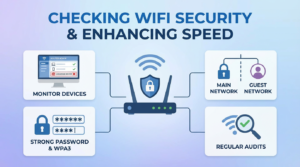
In 2025, cyber threats continue to evolve, and your WiFi network could be vulnerable to security breaches, leading to slow internet speeds. Assessing your network’s integrity is crucial to fix slow internet connection issues and optimize your home network. Hackers might secretly be siphoning your bandwidth, impacting performance. Here’s how to enhance your wireless connection by securing your network.
Firstly, access your router’s admin interface, usually found at 192.168.1.1 or similar, and verify connected devices. If you notice unfamiliar devices, it’s time to take action. Change your WiFi password to something robust, combining letters, numbers, and symbols. Regularly updating this password can effectively resolve WiFi problems related to unauthorized access.
Consider enabling WPA3 encryption if supported by your router. This security protocol offers enhanced protection against intrusions. Additionally, enabling a guest network for visitors can improve WiFi speed by isolating your primary network. For those interested in further securing their digital environment, our guide on AI Malware Detection with Python offers invaluable insights.
For more information on the latest security technology trends, check out this Forbes article on cybersecurity trends in 2025. Maintaining a secure network not only enhances WiFi performance but also protects your data from emerging threats.
Outdated Hardware: The Hidden Culprit
Before diving into complex 2025 WiFi troubleshooting methods, consider the possibility that your hardware might be the hidden culprit. As technology rapidly evolves, older routers and modems may struggle to meet modern demands, causing significant WiFi speed issues. Outdated hardware lacks the capacity to support higher speeds and multiple device connectivity, which can severely impact your network’s performance.
In 2025, optimizing your home network means ensuring all components are up-to-date and capable of handling higher bandwidth requirements. If you’re using equipment older than five years, it could be time for an upgrade. Modern routers offer advanced features like dual-band frequencies and MU-MIMO technology, designed to enhance your wireless connection and significantly improve WiFi speed.
To resolve WiFi problems rooted in outdated hardware, consider these professional recommendations:
- Check router compatibility with the latest internet speeds offered by your ISP.
- Look for routers with WiFi 6 or newer standards.
- Regularly update your firmware for security and performance enhancements.
Updating your hardware not only helps to fix a slow internet connection but also sets a foundation for future-proof technology adoption, ensuring a smooth and seamless online experience.
Fix #1: Rebooting Your Router and Modem
In the year 2025, WiFi speed issues continue to be a common frustration for many households. When your internet connection suddenly slows down, one of the simplest yet often overlooked remedies is rebooting your router and modem. This easy fix can resolve WiFi problems and improve WiFi speed significantly.
Restarting these devices helps clear any temporary glitches and resets the connection parameters, which can enhance your wireless connection. To do this, you need to power off both the router and modem, then wait for about 10-15 seconds before turning them back on. This short pause allows the equipment to clear caches and refresh system protocols, which can optimize your home network’s performance.
According to network experts, regularly rebooting your devices can prevent many common connectivity issues. As WiFi technology evolves, maintaining an optimal performance in your network setup is crucial. By applying these simple WiFi performance tips, you can resolve slow internet connections and enhance your overall browsing experience.
For further guidance on maintaining seamless connectivity, explore our guide on how to fix the latest Windows 11 update causing Bluetooth connectivity issues for advanced troubleshooting techniques.
For an authoritative take on the importance of regular electronic maintenance, you may also want to check out this article from Forbes.
Fix #2: Optimizing WiFi Channel Selection
In 2025, the surge in wireless devices can heavily populate WiFi channels, causing interference that leads to reduced speeds. Optimizing your WiFi channel selection can resolve WiFi problems and significantly enhance your wireless connection. This simple tweak is one of the most effective WiFi performance tips to improve WiFi speed.
Most routers automatically select a channel, but this isn’t always the optimal choice. To manually choose the best channel, you can use apps like WiFi Analyzer or inSSIDer, which identify less congested channels in your area. Switching to a less crowded channel mitigates interference and optimizes your home network, ensuring a more reliable connection.
If you’re unfamiliar with changing your router settings, you might want to consult our comprehensive guide on N8n automation for additional network optimization strategies. Alternatively, consult your router’s manual or visit trusted sources like Forbes for more detailed guidance.
Implementing this fix can swiftly address WiFi speed issues and fix your slow internet connection, empowering you to enjoy a seamless online experience.
Fix #3: Upgrading Your Router to Support 2025 Standards
One of the leading causes of WiFi speed issues in 2025 might be your outdated router. With technology advancing at a rapid pace, ensuring your device can support modern standards is critical. The latest routers are designed to handle faster speeds due to enhanced standards like Wi-Fi 6E and the upcoming Wi-Fi 7. If you haven’t upgraded yet, it might be time to do so, particularly if you’re facing persistent slow internet connections.
Upgrading your router not only helps you fix slow internet connection but also optimizes your home network for multiple devices, ensuring seamless internet use. Newer models come with advanced features such as MU-MIMO, which significantly improves WiFi speed by allowing the router to communicate with multiple devices simultaneously.
For more guidance on optimizing your home network, you can explore our article on boosting efficiency in your tech stack. Additionally, referring to trusted resources like Forbes about the transition to newer WiFi technologies provides valuable insights into the benefits of upgrading your router.
Adopting modern routers is one of the most effective WiFi performance tips, helping you enhance your wireless connection and resolve WiFi problems swiftly.
Fix #4: Ensuring Firmware is Up-to-Date
Keeping your router’s firmware up-to-date is a crucial step in resolving WiFi speed issues that have left many frustrated in 2025. Firmware updates not only patch security vulnerabilities but also improve WiFi speed and overall performance. Outdated firmware could be the hidden culprit that’s causing your WiFi to lag, adversely impacting everything from simple browsing to intensive streaming sessions.
To fix slow internet connection problems, regularly check your router manufacturer’s website or your router’s admin interface for any available updates. This simple step can greatly optimize your home network, enhancing the wireless connection quality. Moreover, modern routers often have an auto-update feature, ensuring that you never miss a critical update.
In today’s connected world, it is essential to stay ahead with the latest tech advancements. Understanding how to detect and remove issues can be as crucial as knowing how to fix common tech problems. For more insights, check out authoritative resources like MIT Technology Review which regularly provides updates on improving technology performance.
Fix #5: Enhancing Your Signal with WiFi Extenders
In 2025, WiFi speed issues can often be attributed to signal reach problems, especially in larger homes or buildings. One effective solution to enhance your wireless connection is through the use of WiFi extenders. These devices amplify the existing signal, improving coverage and optimizing your home network.
WiFi extenders help resolve WiFi problems by ensuring that the signal reaches every corner of your space, thus addressing areas plagued by slow internet connections or dead zones. To maximize efficiency, place the extenders halfway between your router and the areas with weaker WiFi signals. This strategic positioning enhances coverage and internet speed.
For more in-depth network optimization, you can check our comprehensive n8n automation guide, which offers additional WiFi performance tips. Moreover, a fresh perspective on WiFi extenders can be found in expert articles like those from Forbes, detailing the latest technologies shaping signal amplification.
By incorporating WiFi extenders, you not only improve WiFi speed but also reduce frustrations linked with 2025 WiFi troubleshooting while delivering a seamless online experience.
Fix #6: Managing Bandwidth Use with Quality of Service Settings
In 2025, managing your WiFi network’s bandwidth can significantly impact performance, especially if you find your WiFi is suddenly slow. One effective way to fix slow internet connection issues is by adjusting Quality of Service (QoS) settings on your router. These settings allow you to prioritize certain types of traffic, ensuring essential activities like video calls or streaming receive the necessary bandwidth, thereby improving WiFi speed overall.
To start, access your router’s settings through a web browser, typically by entering the IP address found in your router’s manual. Navigate to the QoS section and prioritize traffic for applications that demand higher speed and bandwidth. This can help optimize home network performance and enhance wireless connection reliability by allocating resources more effectively.
For more technical insights on improving your network’s QoS settings, you might want to explore guides like The Comprehensive n8n Automation Guide 2025 on Bytefixes. Additionally, staying updated with industry reports, such as those from Forbes Tech Council, provides valuable WiFi performance tips and strategies to enhance your network’s reliability and resolve WiFi problems efficiently.
By utilizing QoS settings, you take control over bandwidth allocation, helping to eliminate WiFi speed issues in a 2025 setting, thus securing a seamless and stable internet experience for all users in your household.
Fix #7: Seeking Professional Network Assessment
In 2025, WiFi speed issues are more common due to the increasing number of devices and sophisticated networks. If you’ve tried several solutions and your WiFi is still suddenly slow, a professional network assessment might be the answer. Professional technicians can diagnose and resolve WiFi problems that are beyond standard troubleshooting techniques.
Experts can provide detailed insights into optimizing your home network, identifying any interference from neighboring networks, and suggesting changes to enhance your wireless connection. Moreover, they can recommend hardware upgrades, such as routers and extenders, that best suit your environment.
Consider seeking professionals who use advanced tools and techniques to fix slow internet connections. They can tailor solutions to improve WiFi speed and reliability. Not only does this save you time, but it may also integrate seamlessly with other smart home solutions. Consulting with professionals who stay updated on the latest WiFi performance tips can prevent future issues as well.
For a comprehensive understanding of modern network management that complements a professional assessment, consider exploring external resources like Forbes for further insights into managing a robust home wireless network effectively.