Introduction to Building Discord Bots with Python
Creating a Discord bot with Python has become a popular project for both beginners and seasoned developers. This guide will walk you through a straightforward process, making it a perfect beginner’s guide to Discord bot development. In just 15 minutes, you’ll learn how to integrate Python with Discord, providing you with a foundation for more advanced Discord bot development projects.
Discord bots are an excellent way to automate repetitive tasks, manage community interactions, and add engaging functionalities to your server. Whether you’re looking to build a simple Discord bot project or explore more complex bot functionalities, this Python Discord bot tutorial will guide you each step of the way. Python, known for its simplicity and versatility, is an ideal programming language for anyone interested in beginner Python projects. It enables you to quickly develop and deploy your bot, enhancing your servers with custom features.
To enhance your programming journey, consider exploring related topics such as AI malware detection with Python for expanding your Python skills. For additional insights and resources on Discord bot development, check out this comprehensive guide on making a Discord bot with Python.
Why Choose Python for Your Discord Bot?
Python stands out as an excellent choice for creating a Discord bot, especially if you are a beginner seeking a practical introduction to Python programming for Discord. Its simplicity and vast library support make it ideal for quick bot setup on Discord servers. By choosing Python, you gain access to an extensive range of tools and libraries, such as discord.py, which makes bot development an intuitive process. Python’s readability and ease of use allow even those who are new to programming to confidently dive into their first Discord bot project.
Moreover, Python is well-documented and supported by a vibrant community that regularly contributes to forums and tutorials. This means you have a plethora of resources at your fingertips, helping you troubleshoot issues and learn more efficiently. The integration of Python with Discord’s API also means that you can automate Discord servers seamlessly, creating a bot that performs tasks ranging from simple greetings to complex automated responses.
If you’re keen on expanding your automation skills, consider exploring more beginner Python projects on topics like AI malware detection to further enhance your programming capabilities. For additional insights on optimizing technology use, check out our post on how to fix common n8n workflow automation errors. For a comprehensive guide for beginners, visit Real Python’s Discord Bot Tutorial.
Getting Started: Prerequisites for Your Python Discord Bot
Before diving into the creation of your first Python Discord bot, it’s crucial to gather the necessary tools and set up your environment properly. This beginner’s guide to Discord bot development will ensure you start on the right foot. Firstly, ensure you have Python installed on your system, as it is the backbone for the Discord bot you will create. You can download the latest version from the official Python website.
Next, you’ll need to install the Python library, Discord.py, which facilitates interaction between Python and Discord. Simply run the command pip install discord.py in your terminal or command prompt. Having a Discord account is also essential to set up a new server where your bot can function. While creating a Discord bot might seem daunting, this Python Discord bot tutorial simplifies the process.
As you prepare to automate Discord servers, familiarize yourself with the Discord Developer Portal, where you’ll create a new application to generate a token that the bot will use for authentication. To enhance your setup, consider exploring our Home Server Guide to ensure your Python environment runs efficiently.
Remember, integrating Python with Discord is a fantastic way to develop beginner Python projects. For additional reading materials on quick bot setup on Discord, check out this insightful article from Real Python.
Setting Up Your Development Environment
Before diving into the exciting world of Python Discord bot development, it’s crucial to set up your development environment correctly. This step will ensure a smooth and efficient process as you create a Discord bot tailored to your needs.
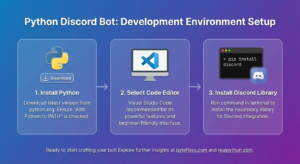
Begin by installing Python, which is the backbone of this beginner’s guide to Discord bot creation. Head over to the official Python website to download and install the latest version. Make sure to check the box that adds Python to your system’s PATH during installation.
Next, you’ll need a code editor to write and test your bot’s scripts. A popular choice among developers is Visual Studio Code, thanks to its powerful features and beginner-friendly interface.
Once your tools are ready, install the Discord library using the command: pip install discord. This library is vital for integrating Python with Discord, allowing your bot to communicate and function within the platform.
For further insights on optimizing your setup, consider checking our post on building a low-power server setup, which may offer additional technological insights beneficial for your simple Discord bot project.
With your environment ready, you’re all set to start crafting your bot and exploring other beginner Python projects. If you need additional guidance, the Real Python Discord bot tutorial offers more in-depth coverage and examples to enhance your quick bot setup process.
Creating a Discord Application and Bot Account
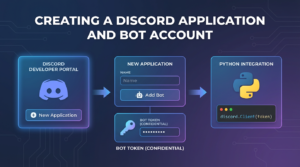
Before you can embark on your quest to build a Discord bot with Python, you’ll need to create a Discord application and bot account. This process is pivotal for anyone looking to dive into Discord bot development and offers a straightforward way to automate Discord servers.
First, head over to the Discord Developer Portal and log in with your credentials. Once there, you can create a new application by clicking the ‘New Application’ button. This step lays the foundation for your simple Discord bot project.
After naming your application, navigate to the ‘Bot’ tab on the left menu and click ‘Add Bot.’ This action will officially create your bot account under the newly formed application. Remember to save your bot’s token, as you’ll need it later for integrating Python with Discord. Keep it confidential, much like protecting your online credentials to avoid unauthorized access.
Beyond this setup, if you’re curious about automating other aspects of your tech life, you might be interested in our Comprehensive n8n Automation Guide. It’s a valuable read for expanding your automation know-how beyond Discord.
Installing Discord.py: The Essential Library for Discord Bots
To kickstart your journey in Discord bot development, installing Discord.py is a crucial step. This library is the cornerstone for anyone looking to create a Discord bot using Python. Designed to make integrating Python with Discord as seamless as possible, Discord.py simplifies the complex interactions between your bot and Discord’s API.
Begin your Python Discord bot tutorial by installing Discord.py. Open your terminal or command prompt and execute the following command:
pip install discord.pyThis simple installation is the gateway to automate Discord servers, allowing you to integrate features effectively for your elements of a simple Discord bot project. For those exploring beginner Python projects, Discord.py offers tremendous versatility without overwhelming complexity.
If you’re encountering any issues during the installation, considering a run-through of our network troubleshooting guide might be handy.
For a deeper dive into understanding how Discord.py functions, you might explore resources like the official Discord.py documentation, which is invaluable for both quick bot setup in Discord and more advanced bot customization.
Writing Your First Lines of Code for the Bot
To kick off your journey into Discord bot development, you’ll be writing your first lines of code. Begin by creating a new Python file, such as bot.py, in your project directory. This is where you’ll write the Python programming for Discord integration. The goal here is a quick bot setup for Discord that communicates with servers efficiently.
Start with importing the necessary modules. You’ll need discord and os at the very start. Here’s a simple snippet:
import discord
import os

client = discord.Client()
This code imports the discord library and creates a client instance, marking the first step in your simple Discord bot project. This client’s role is to interact with Discord’s API seamlessly, allowing you to automate Discord servers.
Excited for more advanced features? Check out our AI malware detection with Python guide to broaden your coding skills.
By following this beginner’s guide to Discord bot programming, you’ll soon be able to handle more complex tasks. For more in-depth tutorials, visit Real Python, a fantastic resource for Python learners.
Connecting Your Bot to a Discord Server
Now that you’ve successfully set up your simple Python Discord bot project, it’s time to connect it to a Discord server. Follow these steps to see your bot in action and start automating tasks. This is a crucial part of creating a Discord bot as it enables your bot to interact with your server members.
First, navigate to your Discord Developer Portal and select your bot application. Under “OAuth2,” you’ll find the “URL Generator” section.
Steps to Connect:
- Select the scopes that are necessary, ensuring to choose “bot” to generate a bot invite link.
- Scroll down to “OAuth2 URL Generator” and select permissions your bot will need. For starters, “Send Messages” is usually sufficient for basic functionalities.
- Copy the generated URL, paste it into your browser, and choose the server you wish to add your bot to.
Now, check your selected server to see your bot online and ready to engage. For more advanced Discord bot development or to integrate Python with Discord, consider exploring our other resources on related topics.
By successfully linking your bot, you’ve harnessed the potential of Python programming for Discord, as demonstrated in this beginner’s guide to Discord bot creation. For further insights on utilizing technology in innovative ways, check our guide on AI malware detection with Python.
Handling Events: Making Your Bot Respond to Commands
Once you’ve got the basics covered, it’s all about handling events to make your bot respond effectively to commands. This is where integration with Discord’s API becomes a game-changer. In this phase of Discord bot development, you’ll leverage Python’s capabilities to create a responsive action that fulfills the active commands from server members.
To start, the Discord Python library, known as discord.py, provides a simple structure to organize your bot’s code. Here, you can set up event listeners that check for specified messages or commands. If you’re starting with a simple Discord bot project for beginner’s guide to Discord bot enthusiasts, use the client.event decorator to define a function that executes when a particular event (like a message) is detected.
For instance, you can have your bot log certain messages or respond with a specific quote. Want to deep dive into AI-powered automation projects? This initial command setup is analogous to beginner Python projects where you automate Discord servers step-by-step.
For further insights and code examples, check out this guide from Real Python to enhance your understanding of Discord bot commands.
Testing Your Discord Bot for the First Time
Once you’ve developed your Python Discord bot, it’s time to test it and ensure everything runs smoothly. Begin by verifying your bot is connected to your Discord server. A simple way to do this is to look for your bot’s name in the server’s online member list.
Next, check your bot’s response to a basic command you have programmed. For a beginner’s guide to Discord bot development, it might just be a command to send a simple greeting. Type the command in your server’s chat and see if your bot replies as expected. This step is crucial in automating Discord servers and ensuring your code functions correctly.
If your bot doesn’t respond, reexamine your code and verify you’ve correctly followed the steps in this Python Discord bot tutorial. Consider consulting official documentation on Discord.py for insights. Additionally, take advantage of our guide on GrapeTask to learn more about how Python programming can enhance various projects.
Troubleshooting Common Discord Bot Errors
When creating a Discord bot using Python, beginners often encounter a range of common errors. These can sometimes be frustrating, but understanding their root causes can simplify the Python Discord bot tutorial and enhance your skills. This section of our beginner’s guide to Discord bot development will explore frequent issues and their solutions. By addressing these pitfalls, you’ll be better equipped to automate Discord servers smoothly.
One common issue is incorrect token configuration. Ensure that your bot token in the Python script matches the token provided by the Discord Developer Portal. If you face authentication errors, revisit your token integration. Network connectivity errors can also impede your bot. Verify your internet connection and ensure no firewall settings block your requests.
Another frequent mistake is using deprecated libraries. Regularly update your coding libraries to avoid compatibility issues. Additionally, pay attention to your syntax; errors in commands within your simple Discord bot project can lead to unexpected behavior.
For more advanced troubleshooting techniques, explore our guide on fixing workflow automation errors. Also, the external guide from Real Python provides comprehensive insights into Python programming for Discord bots.
Mastering these troubleshooting steps will streamline your quick bot setup on Discord and enhance your proficiency in integrating Python with Discord for engaging projects.
Conclusion: Next Steps and Resources
Congratulations on creating your first Discord bot with Python! This beginner’s guide to Discord bot development has shown you how accessible and rewarding it can be. Now that you’ve accomplished a simple Discord bot project within just 15 minutes, you’re well-equipped to explore deeper into the fascinating world of Discord bot programming.
Your next steps could involve expanding your bot’s functionality to automate Discord servers with more advanced features, or even integrating Python with Discord to create more complex interactions. Our comprehensive resources, such as the AI Malware Detection with Python guide, can further enrich your Python programming skills.
For further learning, consider exploring external tutorials and forums where communities share ideas and troubleshoot issues. An excellent external resource is the official Discord.py documentation, which offers extensive information and examples to help you enhance your bot development skills.
Remember, every great developer started with a simple project like this. Embrace each challenge as an opportunity to grow, and before you know it, you’ll be paving the way for others in quick bot setup for Discord.