Introduction to Firewalls: Your Essential Guide
In today’s digital age, understanding what a firewall is and its importance in network security is crucial. As cybersecurity threats become more sophisticated, a firewall serves as an essential defender in your IT security arsenal. But what exactly is a firewall? At its core, a firewall is a security software or hardware device designed to monitor and control incoming and outgoing network traffic based on predetermined security rules.
Firewalls act as a barrier between your internal network and potential online threats, providing internet protection and safeguarding your data. They are a key element of cybersecurity basics, ensuring unauthorized access is blocked while allowing legitimate communication to pass through.
There are various firewall types, including network firewalls and application firewalls, each with specific configurations and use cases. Understanding these differences helps tailor firewall configuration to fit your specific needs.
To dive deeper into the world of online security, consider reading our comprehensive guide on cybersecurity myths.
For further reading on firewalls and their critical role in IT security, check out Cisco’s resources on firewalls.
What is a Firewall? Understanding the Basics
A firewall is an essential component of network security designed to protect your IT infrastructure from various online threats. Acting as a barrier between your internal network and external environments, it monitors and controls incoming and outgoing network traffic based on predetermined security rules. This crucial element of internet protection serves as a first line of defense against potential cyber attacks, unauthorized access, and malicious software.
Understanding firewall types is key to optimizing your cybersecurity strategy. Generally, firewalls can be categorized into hardware and software variants. Hardware firewalls are physical devices placed between your network and gateway, while software firewalls are programs installed on individual computers. Each type offers distinct advantages in terms of scalability, data protection, and ease of firewall configuration.
As you delve deeper into cybersecurity basics, consider how a robust network firewall enhances IT security and complements other security software solutions. For more insights on improving your online safety, explore our guide on 7 cybersecurity myths that put you at risk in 2025. Additional comprehensive resources are available from trusted security platforms like Kaspersky to further solidify your understanding of firewalls.

How Do Firewalls Work? A Beginner’s Overview
Firewalls serve as a crucial component in network security by acting as a barrier between your trusted internal network and untrusted external networks, such as the internet. Understanding how firewalls operate is essential for anyone interested in cybersecurity basics.
At their core, firewalls are security software solutions that scrutinize incoming and outgoing data packet traffic based on predetermined security rules. By doing so, they filter out online threats and unauthorized access attempts, providing robust internet protection.
- Packet Filtering: This is the most basic form of a firewall. It inspects packets of data and blocks them if they do not comply with established cybersecurity rules.
- Stateful Inspection: An advanced type of firewall where it tracks the state of active connections and determines which network packets to allow through the firewall.
- Proxy Service: It acts as an intermediary where the firewall retrieves data from the internet and forwards it to the requesting system, offering an extra layer of IT security.
For data protection, effective firewall configuration is vital. It ensures the proper enforcement of security policies tailored to your network’s needs. If you’re interested in delving deeper into firewall configuration, consider exploring 7 Cybersecurity Myths That Put You at Risk in 2025 on our site. Additionally, for further reading, check out this comprehensive guide on firewalls.
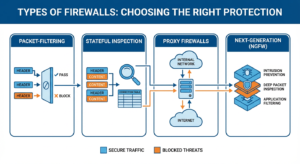
Types of Firewalls: Choosing the Right Protection
When it comes to network security, choosing the right type of firewall is crucial for ensuring your system’s integrity and data protection. Firewalls are designed to block unauthorized access while permitting authorized communications, acting as a critical safeguard in your IT security strategy. This section will highlight various firewall types to help you determine the right one for your needs.
Packet-Filtering Firewalls
Packet-filtering firewalls are the simplest form. They work by examining the data packets sent across the network. These firewalls ensure that malicious packets are blocked based on protocol headers. While effective for basic internet protection, they might not be sufficient against more complex online threats.
Stateful Inspection Firewalls
These firewalls offer more advanced protection than packet-filtering varieties by keeping track of the state of active connections. They analyze both packet headers and contents, providing a robust solution for cybersecurity basics. Stateful inspection firewalls are typically preferred for more comprehensive network firewall protection.
Proxy Firewalls
Proxy firewalls act as intermediaries between you and the internet, vetting incoming and outgoing traffic. This adds an additional layer of security software that can effectively filter malicious content. Although they may reduce speed, their thorough inspection capabilities make them valuable for heightened data protection.
Next-Generation Firewalls (NGFWs)
NGFWs combine traditional firewall capabilities with advanced features like intrusion prevention, deep packet inspection, and application filtering. These firewalls offer superior IT security and are ideal for environments requiring complex firewall configuration to combat sophisticated threats.
Conclusion
Determining which firewall type best suits your network depends on your specific needs and threat landscape. Understanding these different types can help ensure that you erect the strongest possible defenses against unauthorized access and potential breaches. For more tips on bolstering your online security, consider our guide on preventing social engineering. Additionally, you can find more detailed information on firewalls and their functionality from Cisco’s firewall overview.
Why You Need a Firewall: Key Benefits for Security
In today’s digital age, protecting your online assets has become more critical than ever. A firewall serves as your first line of defense, offering a range of benefits crucial for maintaining robust security protocols. Understanding why you need a firewall can be a game-changer in mitigating the risks of online threats.
Firewalls act as a barrier between your network and external threats, providing essential network security to prevent unauthorized access. By filtering traffic, they ensure only trusted sources can communicate with your system. This reduces the risk of intrusions and data breaches, enhancing overall internet protection.
Moreover, a network firewall allows for customizable firewall configuration, enabling you to tailor security settings to fit specific organizational needs. This adaptability is vital for businesses of all sizes, as it provides flexibility in safeguarding sensitive information and maintaining IT security.
- Blocks unauthorized access and potential threats
- Monitors incoming and outgoing traffic
- Facilitates secure data exchange
- Allows for firewall configuration adjustments to meet specific needs
For a deeper understanding of how to bolster your IT security beyond firewalls, explore our article on preventing social engineering attacks.
For more insights from an authoritative source on firewalls, you can visit Cisco’s guide on what a firewall is.
Hardware vs. Software Firewalls: Which is Better?
When diving into the world of network security, choosing between hardware and software firewalls is a pivotal decision. Both firewall types serve as essential components of IT security, offering a shield against online threats. But how do you decide which is better for your needs?
Hardware firewalls stand as the robust gatekeepers of a network. They are physical devices installed between your internet connection and network, providing a higher degree of protection without slowing down your system. Ideal for businesses or homes with multiple devices, hardware firewalls can handle substantial traffic, ensuring seamless internet protection and data protection across the board.
On the flip side, software firewalls are applications installed on individual devices. They offer flexibility and ease of firewall configuration, making them a favorite among individual users. Software firewalls excel in protecting against application-specific threats and are part of the broader category of security software solutions.
For comprehensive protection, combining both types can be advantageous. While hardware firewalls guard your network as a whole, software firewalls add an extra layer of personalized defense, tackling specific online threats. To delve deeper into how to protect your digital space, explore our recent article on the browser flaws that highlight the importance of layered security.
For further insights into firewall essentials, you might explore external resources like Cisco’s comprehensive guide on firewalls.
Common Firewall Features and How They Protect You
Firewalls are integral to network security as they help safeguard your digital assets from various online threats. Understanding the key features of different firewall types can empower you to optimize your firewall configuration effectively. Below are common features of firewalls and how they bolster your internet protection:
- Packet Filtering: This feature examines incoming and outgoing data packets and permits them based on predefined rules. By blocking certain types of traffic, packet filtering acts as a gatekeeper, crucial in maintaining IT security.
- Stateful Inspection: Unlike basic packet filters, stateful inspection considers the connection’s state and attributes, providing a more sophisticated layer of data protection. This feature helps in identifying suspicious activities and blocking potential cybersecurity threats.
- Proxy Service: Acting as an intermediary, proxy servers prevent direct connections between your device and the internet, thus providing an added level of online anonymity and security software integrity. This helps in the mitigation of security breaches.
- Deep Packet Inspection (DPI): DPI offers an advanced level of network firewall security by examining the data portion of a packet. It helps in identifying, categorizing, and blocking complex threats.
The firewall’s role in cybersecurity basics cannot be overstated; it serves as the first line of defense in a multi-layered security approach. For further insights into maintaining robust security, explore our guide on Preventing Web Vulnerabilities.
For more information on how firewalls can benefit your digital safety and security, you may also refer to comprehensive external resources such as Cisco’s Firewall Guide.
Setting Up a Firewall: Step-by-Step Guide
To fortify your IT security, learning how to set up a firewall is indispensable. Whether you choose a hardware firewall or software solution, understanding the basics is crucial for network security and internet protection. Here’s a step-by-step guide to firewall configuration that will help you defend against online threats effectively.
Firstly, determine the type of firewall suited for your needs. Explore different firewall types and decide whether a network firewall or a host-based firewall fits your cybersecurity plan. For comprehensive protection, consider integrating both into your strategy.

1. Install the Firewall
Begin by installing the firewall on your network or device. For hardware firewalls, this involves connecting the device to your network infrastructure. Software firewalls require installing security software on your computer or servers.
2. Configure Firewall Settings
Access the firewall’s administration settings to customize the rules that manage data flow. Define inbound and outbound traffic, block unauthorized access, and set up alerts for suspicious activity to enhance data protection.
3. Set Access Controls
To bolster network security, establish user-specific access controls. This step is vital in preventing unauthorized access and safeguarding sensitive information from potential breaches.
Enhance your understanding of IT security by exploring the ultimate security guide for applications like WhatsApp, available on our site: The Ultimate WhatsApp Security Guide: Lock Down Your Privacy.
For a broader perspective on firewall implementation, refer to external resources such as this comprehensive guide from Cisco’s Firewall Guide, which provides professional insights into ensuring robust network defense.
Troubleshooting Common Firewall Issues
Firewalls are pivotal for network security and act as a robust barrier against online threats. However, users often encounter issues during firewall configuration that can impede these benefits. Understanding these common challenges will aid in resolving them efficiently.
Here are some typical firewall issues and their troubleshooting steps:
- Blocked Trustworthy Applications: Sometimes, legitimate applications may be blocked incorrectly. To resolve this, check your security software’s settings and add these applications to the “allow” list.
- Connectivity Problems: Ensure your firewall settings aren’t overly restrictive. Reassess policies and rules that may be obstructing internet access. Consult your IT security team for tailored adjustments.
- Overlapping Rules: In configurations featuring multiple firewall types, conflicting rules can arise. Review and consolidate rules for streamlined data protection.
- Firewall Logs: Regularly check logs for patterns indicating issues. Configuring alerts for specific network firewall activities can proactively address potential threats.
Understanding these basics is essential for maintaining secure internet protection. For more insights on securing online environments, explore our guide on protecting your online identity. Additionally, for further reading on firewalls and their intricacies, check out Cisco’s comprehensive firewall guide.
Firewall Maintenance: Best Practices for Optimal Security
Maintaining your firewall is essential to ensure your network firewall offers the strongest line of defense against online threats. Regular updates and inspections are vital components of optimal firewall maintenance. To maintain robust internet protection, follow these best practices:
- Regular Updates: Always update your firewall software to the latest version. New updates often contain patches for vulnerabilities and provide enhanced protection against the latest cybersecurity threats.
- Configuration Audits: Conduct regular audits of your firewall configuration. Ensure rules and policies align with your current IT security strategies, adjusting them as needed to meet evolving threats.
- Log Monitoring: Monitor firewall logs to detect unusual activities or potential breaches. Log analysis is a fundamental element in identifying attempted cyber-attacks promptly.
- Backup Settings: Regularly back up your firewall settings. In the event of a failure or hack, having a backup ensures quick restoration of your network security configurations.
By adhering to these maintenance practices, you not only secure your system but also prevent costly data breaches. For more insights into cybersecurity basics and how to bolster your defenses, explore our in-depth guide on cyber threats. Additionally, authoritative guidance on firewall management can be found on the Cisco website.
Firewall vs. Antivirus: Understanding the Differences
When diving into the realm of cybersecurity basics, understanding the differences between a firewall and antivirus software is crucial for bolstering your internet protection. Both play significant roles in safeguarding your IT security, yet they address different types of online threats and function in unique ways within the landscape of network security.
A firewall acts as a gatekeeper for your network, monitoring incoming and outgoing traffic based on predefined security rules. This means it can prevent unauthorized access, offering a strong line of data protection against external threats. Firewalls can be hardware-based, software-based, or a combination of both, making firewall configuration a flexible solution tailored to varying security needs. For a detailed look at configuring network protection, explore our guide on preventing web vulnerabilities.
Antivirus software, on the other hand, is specialized security software designed to detect, quarantine, and remove malicious code that may already be present on your device. It scans files and processes to provide real-time protection against malware, including viruses, worms, and trojans. For further information on choosing between security solutions, the Federal Communications Commission provides guidelines on their cybersecurity tips page.
Top Firewall Solutions in 2023: Recommendations and Reviews
Norton Network Security Suite
Norton is a trusted name in cybersecurity, and its Network Security Suite continues to be a top choice for IT security in 2023. This firewall solution offers comprehensive internet protection, catering to both personal and business needs with robust firewall types, including intrusion detection and prevention systems. Not only does it focus on monitoring incoming and outgoing traffic, but it also ensures your data remains safe from online threats with its state-of-the-art data protection features. Additionally, Norton provides user-friendly firewall configuration, making it accessible even for those new to cybersecurity basics. For more insights on how hackers manipulate online vulnerabilities, you might explore our detailed guide on Social Engineering and Prevention.
Bitdefender Firewall
Known for its superior security software, Bitdefender Firewall offers exceptional online protection strategies in 2023. It is particularly praised for its adaptive cybersecurity technology, which dynamically tunes the firewall’s settings to tackle emerging threats. Bitdefender is lauded for its seamless integration with various operating systems and its exceptional balance between protection and performance. The software’s intuitive interface guides users through firewall configuration with ease, making it a smart choice for both beginners and advanced users managing network firewalls. For an authoritative resource on firewalls, consider visiting Cisco’s Understanding Firewalls page.
McAfee Total Protection
McAfee is another stalwart in the realm of network security, and its Total Protection suite ensures extensive online coverage throughout 2023. This firewall solution is well-equipped to handle advanced cyber threats with its real-time defense mechanisms and excellent threat intelligence systems. It offers comprehensive protection across various devices, making it an ideal option for families and small businesses focused on cybersecurity needs. With easy firewall configuration and extensive support, McAfee helps users fortify their online defenses effectively. As online threats continue to evolve, ensuring your systems are well-protected has become a necessity. For those looking to secure their online identity further, our discussion on Dark Web Password Checks might pique your interest.
Firewall Solutions for 2023 – Conclusion
As you explore potential firewall solutions for your network security needs, understanding the fundamental aspects of each offering is crucial. Whether it is Norton’s insightful security features, Bitdefender’s adaptive protection, or McAfee’s all-encompassing security suite, each provides a distinct approach to IT security. Choosing the right firewall can significantly mitigate online threats and reinforce your data protection measures. For a broader understanding of how to enhance your cybersecurity strategy, delve into our comprehensive exploration of basic cybersecurity concepts and practices for a robust defense mechanism.